Server Hardware
Recommended Hardware
This guide will talk about the recommended hardware for running a BrainFrame Server, and how to install drivers to enable different inference accelerators.
AI Computer/Machine Requirements
Local AI inference requires a network-connected Linux host. Hardware acceleration is optional, but recommended for optimal performance.
- Operating System: Ubuntu 22.04 LTS or 24.04 LTS
- Processor (CPU): Intel Core i5 / i7 / i9 (desktop, laptop, or edge/mini PC)
- Hardware Acceleration (Optional): Intel iGPU, discrete NVIDIA GPU, or certified AI accelerator
- Memory (RAM): 8 GB minimum (supports up to 8 standard IP camera streams; higher capacity recommended for multi-capsule workloads)
- Storage: 256 GB SSD or higher
- Connectivity: Local network connection (Ethernet recommended for IP/RTSP camera ingestion)
- Audio Output (Optional): 3.5 mm jack, HDMI audio, or built-in speaker (for real-time audible alerts and alarms)
Enabling GPU Acceleration
Most capsules will run significantly faster if an NVIDIA GPU is available to provide hardware acceleration. However, capsules that use OpenVINO are optimized to run well on CPU and won't benefit from the availability of a GPU. We recommend deciding what capsules you'll need before deciding whether a GPU is necessary for you. See all available capsules here.
If you are using a GPU, we recommend an NVIDIA GTX 1060 or better. AMD GPUs are not supported at this time.
Drivers
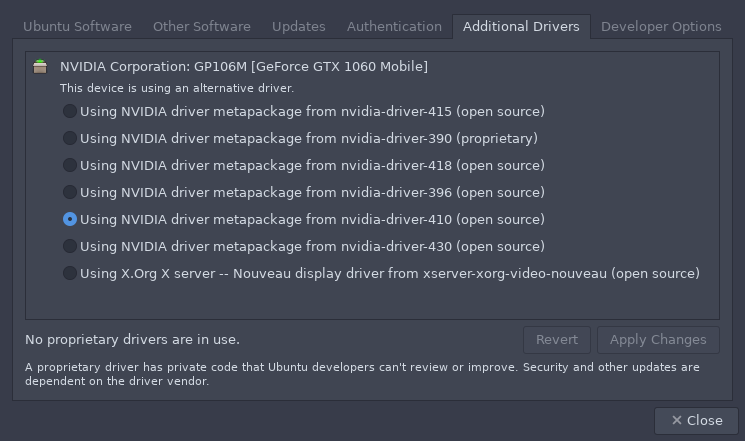
BrainFrame requires that the NVIDIA graphics drivers be installed before the GPU can be utilized. To do this, launch the "Software & Updates", application. Then, on "Additional Drivers" tab, Select "Using NVIDIA driver metapackage" option, and click "Apply Changes". If there are multiple NVIDIA driver metapackages available, prefer the most recent one.
Docker Passthrough
If you have an Nvidia GPU, you can enable hardware acceleration by installing Nvidia Docker 2. Please refer to the installation guide.
Then, make the Nvidia Container Runtime the default runtime for Docker by
editing /etc/docker/daemon.json to have the following configuration:
{
    "runtimes": {
        "nvidia": {
            "path": "/usr/bin/nvidia-container-runtime",
            "runtimeArgs": []
        }
    },
    "default-runtime": "nvidia"
}
You can probe hardware inference acceleration devices using BrainFrame CLI devices command.