VisionCapsules®
 A VisionCapsule is a self-contained package that holds an AI model or an algorithm, together
with the code that BrainFrame needs to run it. You can download a capsule from the
AI Marketplace, load it into BrainFrame, and run it on your streams without any
engineering work. Capsules are grouped by what they do: detectors, classifiers, encoders and trackers.
Capsules from different developers work together. BrainFrame passes the output of one capsule to the next, so, for example, a tracker capsule can follow the objects that a detector capsule from another developer finds. Capsules are loaded and unloaded while BrainFrame is running.
OpenVisionCapsules
VisionCapsules follow the OpenVisionCapsules format, an open format for packaging models and algorithms so that they can be combined. It is released under the BSD license, and its source code is hosted by OpenCV on GitHub: opencv/open_vision_capsules.
The format exists for two reasons:
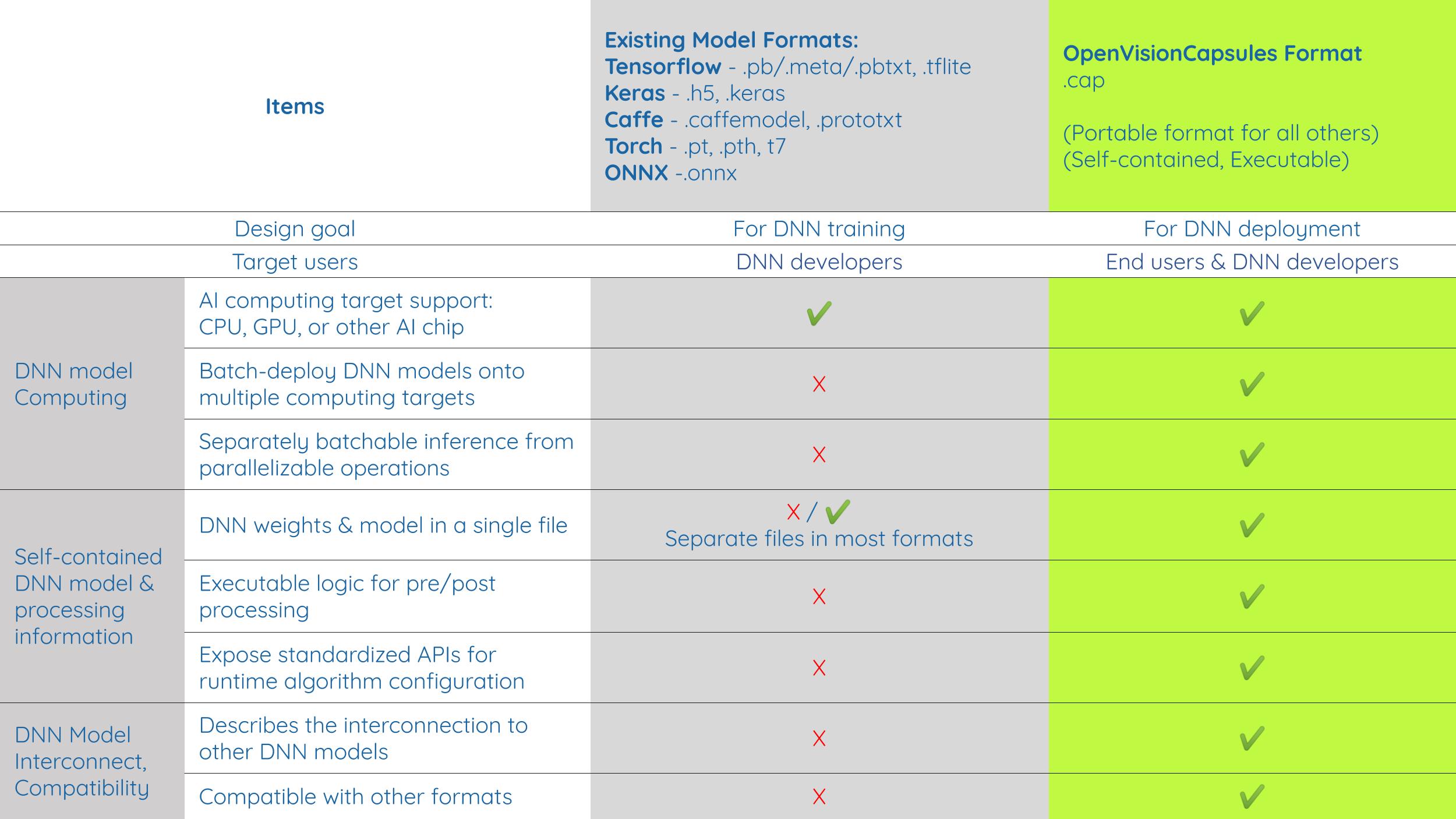
- Many variants of a model. A model often has to be trained or fine-tuned for a specific use case, so one model can turn into many variants. A common format lets developers share the parts that are the same (for example a tracker) and change only the part that is specific to the use case (for example a detector).
- Different frameworks and hardware. A capsule wraps the model of any framework, such as TensorFlow, PyTorch, Keras, Caffe or ONNX, and can run it with an acceleration library such as OpenVINO or TensorRT. The capsule defines the same inputs, outputs and options whatever model is inside.
The table compares the model formats of the common frameworks, which are made for training a network, with the OpenVisionCapsules format, which is made for deploying it:
A capsule has:
- the model and its pre-processing and post-processing code;
- the input and output types (the capsule declares what it needs and what it produces, which is how BrainFrame connects capsules);
- the hardware it runs on;
- the options that a user can change at run time, for example a confidence threshold (see Capsule Options).
A capsule is written in Python with the capsule SDK and packaged into a .cap file, a zip file that can be encrypted
to protect the model and the code.
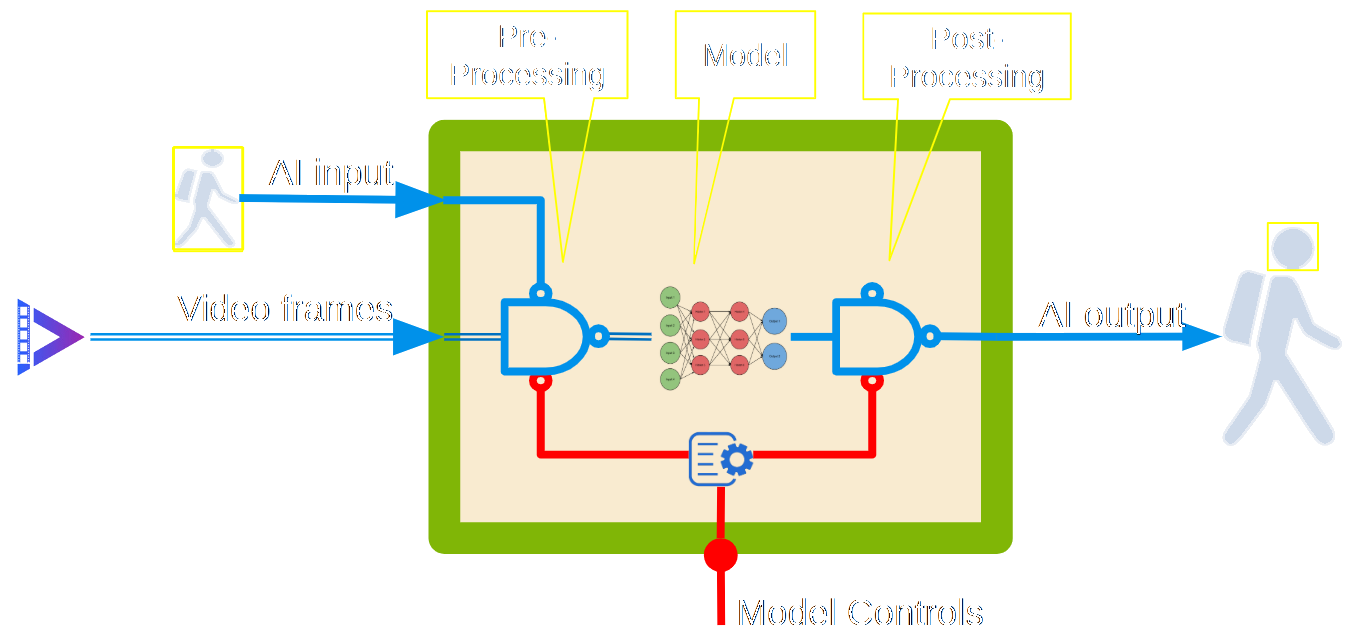
The diagram shows what is inside a capsule: the video frames and the AI input (the detections of other capsules) come in, the capsule pre-processes them, runs the model and post-processes the result into the AI output, and the model controls (the capsule options) configure the processing.
Capsule Fusion and Model Router
Because every capsule declares its input and output in the OpenVisionCapsules format, BrainFrame can fuse several capsules automatically. You do not write any code to connect them: BrainFrame reads what each capsule needs and what it produces, and passes the output of one capsule (the AI output) to the capsules that take it as input (the AI input), along with the video frames.
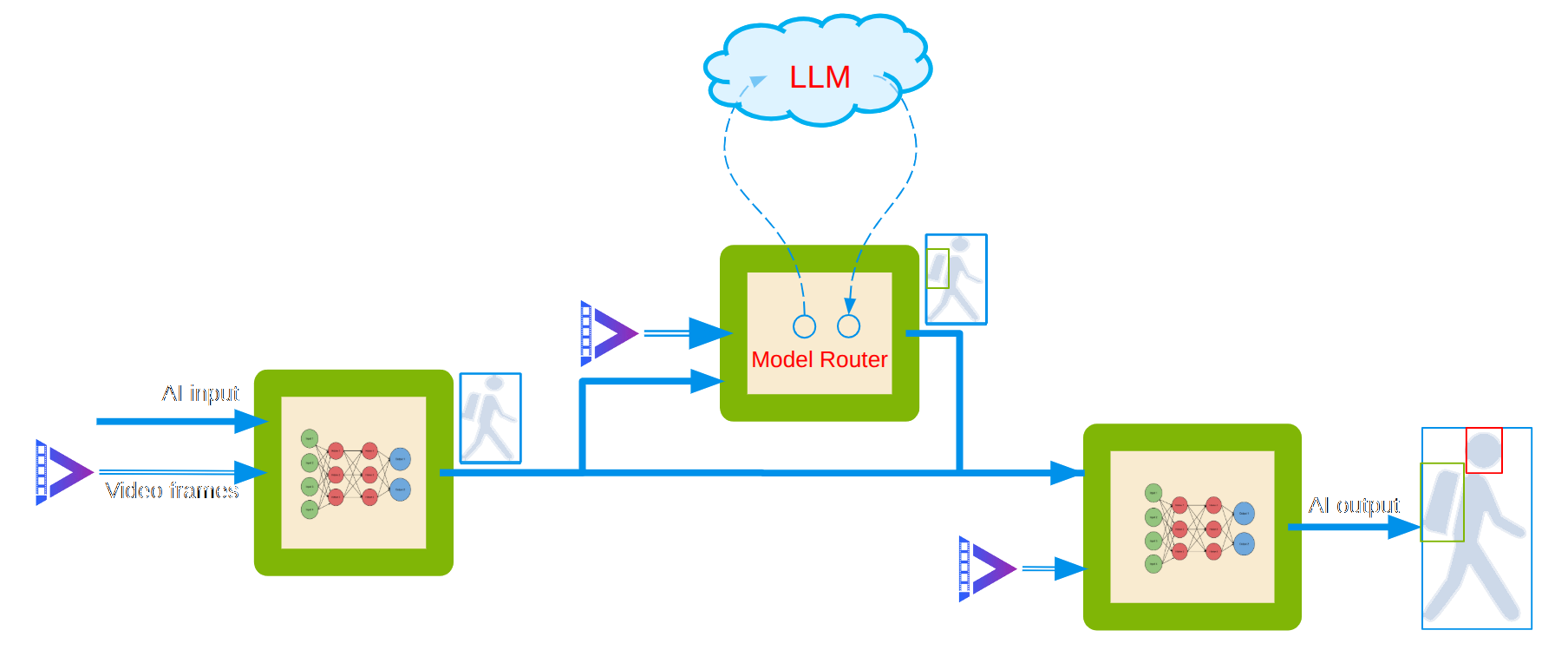
The diagram shows three capsules that BrainFrame fuses into one pipeline, for this use case: find each person in the video, know whether the person carries a backpack or anything else, and find the face of the person. All three capsules read the same video frames.
- A person detector (the first capsule, left) takes the video frames and finds the people. Its AI output is a list of person detections, drawn as the person in a box.
- A model router (the capsule at the top) takes the video frames and the person detections. It cuts each person out of the frame and asks an LLM, with a prompt that you write, for example: "Does this person carry a backpack or anything else? Describe it." An LLM can recognize features that are probably not common, which a small model that was trained on a fixed list of classes does not know, for example a special backpack. The dashed arrows show the request that goes out to the LLM and the answer that comes back. The model router adds the answer to the detection of that person.
- A face detector (the last capsule, right) is a capsule that runs on your local server. It takes the person detections and the answers of the model router as its AI input, and finds the face of each person in the video frames. Its AI output is the final result: the person, the face, and what the LLM said about the person, which is available through the BrainFrame API and to other capsules. Because the faces are detected on the local server, the face data stays local, which protects privacy.
The person detector and the face detector are small models that run at the edge, on your own server. Only the model router uses an LLM, and only for what a small model cannot answer, such as an uncommon item that a person carries. You can use an LLM in the cloud, or one that you run on your own network (see below). The model router sends the picture of the person to the LLM, so if that picture must stay inside your network too, use an LLM on your own network.
You connect the capsules just by loading them in BrainFrame. BrainFrame sees that the output of the person detector matches the input of the model router and of the face detector, and passes the data on.
The fusion works for different kinds of models:
- Models at the edge. Detectors, classifiers, trackers and other capsules that run on your own server, on a CPU, a GPU or another accelerator, are fused as described above.
- LLMs in the cloud. A model router capsule sends a detection, with a prompt that you write, to a cloud LLM through its API, for example Claude, ChatGPT or Gemini, and adds the answer to the detection.
- LLMs on your own network. The model router can also send the detections to an LLM that you deploy locally, on a private network, so that the images do not leave it. The Classifier Model Router works with any OpenAI-compatible server, such as vLLM or Ollama. You can also write a model router for a server with a different API.
For the model router capsules, how to set them up, and their source code, see Model Routers.